


SwiftCase
PlatformSwitchboardSolutionsCase StudiesPricingAboutContact
Book a Demo
SwiftCase

Workflow automation for UK service businesses. Created in the UK.

A Livepoint Solution

Product

  • Platform
  • Switchboard
  • Pricing
  • Case Studies

Compare

  • vs Salesforce
  • vs ServiceNow
  • vs HubSpot
  • vs Zendesk
  • vs Jira
  • All Comparisons

Company

  • About
  • Careers
  • Partners
  • Press
  • Blog
  • Contact

Resources

  • Guides & Templates
  • FAQ
  • Help Centre
  • Glossary
  • Book a Demo

Legal

  • Privacy
  • Terms
  • Cookies
  • Accessibility
Cyber Essentials CertifiedGDPR CompliantUK Data CentresISO 27001 Standards

© 2025 SwiftCase. All rights reserved.

Back to Blog
Workflow Automation

How to create an Email Template

Email Templates pre-populate the content of an email, saving you and your team from repeatedly typing out the same emails to your clients. Creating an Email Template Note: Tags are used to generate...

Dr. Adam Sykes

Dr. Adam Sykes

Founder & CEO

June 4, 2024
3 min read
How to create an Email Template

Email Templates pre-populate the content of an email, saving you and your team from repeatedly typing out the same emails to your clients.

Creating an Email Template

  1. ClickAdmin.
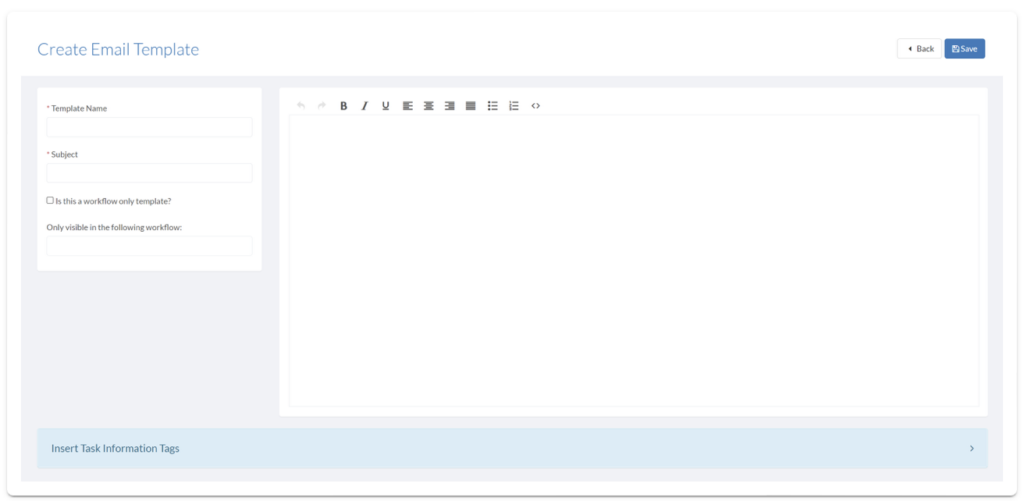
  2. Click the View button on the Email panel. This will take you to the Email Template page.
  3. ClickCreate Template.
  4. Add a Template Name and a Subject.
  5. If the Email Template should only be able to send from a workflow, check the Is this a workflow only Template? checkbox and select a Workflow.
  6. Add a Template Name and a Subject.
  7. Add the text you want to appear on the email in the blank box.
SwiftCase platform screenshot

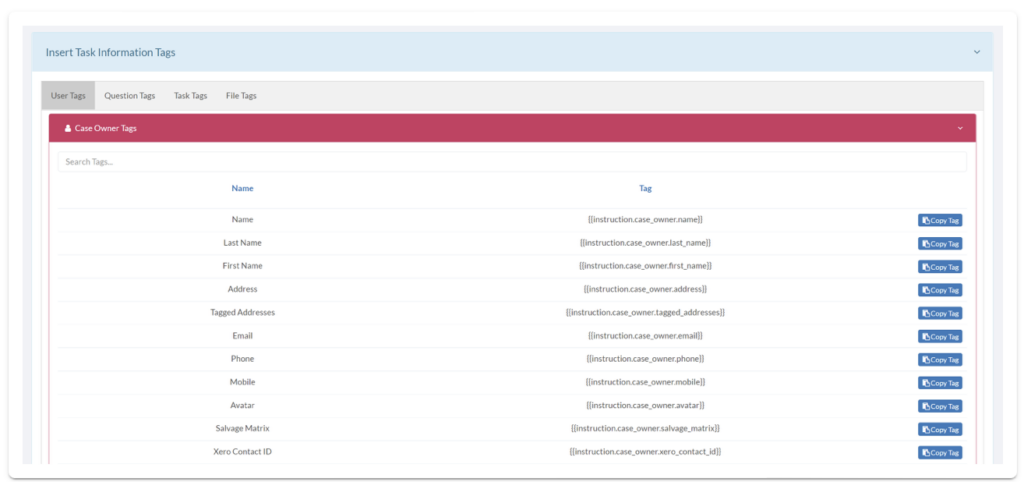
  1. ClickInsert Task Information Tagto open lists ofUser,Question,Task, andFile Tagsto copy and paste into your email template.
SwiftCase platform screenshot

  1. ClickSave.

Note:

Tags are used to generate and display information from the Task, allowing each email to be customisable to the recipient/subject.

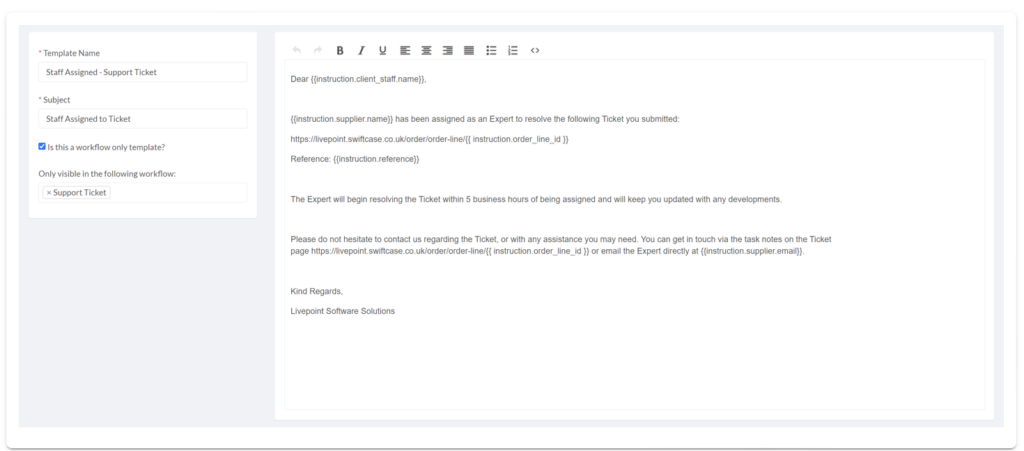
Example Email Template
SwiftCase platform screenshot

  • Address the Client Staff
  • Tell them the Expert that has been assigned to solve their ticket
  • Give them the URL of the ticket
  • Give them the Ticket Reference Number
  • Give them the Expert’s Email

Ready to automate your workflows?

SwiftCase helps operations teams streamline their processes with powerful workflow automation, case management, and AI-powered communication tools.

Book a demo | View pricing | Explore the platform

About the Author

Dr. Adam Sykes
Dr. Adam Sykes

Founder & CEO

Help to Grow: Digital Approved Vendor

Founder & CEO of SwiftCase. PhD in Computational Chemistry. 35+ years programming experience.

View all articles by Adam →

Want to read more?

Check out our other articles on workflow automation and business efficiency.

View All Articles