


SwiftCase
PlatformSwitchboardSolutionsCase StudiesPricingAboutContact
Book a Demo
SwiftCase

Workflow automation for UK service businesses. Created in the UK.

A Livepoint Solution

Product

  • Platform
  • Switchboard
  • Pricing
  • Case Studies

Compare

  • vs Salesforce
  • vs ServiceNow
  • vs HubSpot
  • vs Zendesk
  • vs Jira
  • All Comparisons

Company

  • About
  • Careers
  • Partners
  • Press
  • Blog
  • Contact

Resources

  • Guides & Templates
  • FAQ
  • Help Centre
  • Glossary
  • Book a Demo

Legal

  • Privacy
  • Terms
  • Cookies
  • Accessibility
Cyber Essentials CertifiedGDPR CompliantUK Data CentresISO 27001 Standards

© 2025 SwiftCase. All rights reserved.

Back to Blog
Business

Moving Rules - Button Clicked

The Button Clicked Moving Rule moves to a specified status once the User clicks the button. Adding a Button Clicked Moving Rule Note: The button must be ones that have been created in the current s...

Dr. Adam Sykes

Dr. Adam Sykes

Founder & CEO

June 5, 2024
2 min read
Moving Rules - Button Clicked

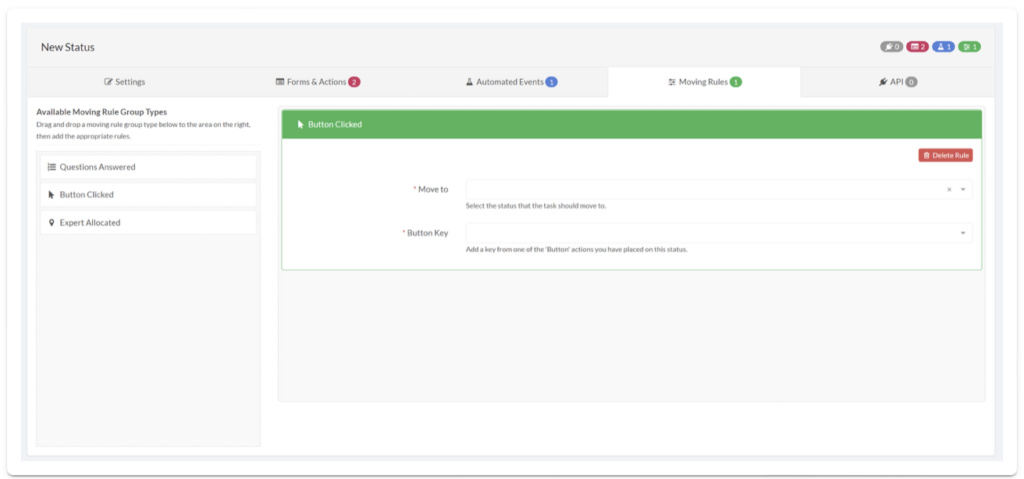
TheButton ClickedMoving Rule moves to a specified status once the User clicks the button.

Adding a Button Clicked Moving Rule

  1. Click the Moving Rules tab on the Status to which you want to add the moving rule.
  2. Drag and drop the Button Clicked moving rule into the blank space on the right.
  3. In the Move to box, select the status you want to move to, after a button(s) is clicked.
  4. In the Button Key box, enter the button key of the button you want to trigger the status change.
  5. To add another button rule, drag and drop the Button Clicked rule into the box and repeat the first two steps.
SwiftCase platform screenshot

Note:

The button must be ones that have been created in the current status that you are making the moving rules for.

About the Author

Dr. Adam Sykes
Dr. Adam Sykes

Founder & CEO

Help to Grow: Digital Approved Vendor

Founder & CEO of SwiftCase. PhD in Computational Chemistry. 35+ years programming experience.

View all articles by Adam →

Want to read more?

Check out our other articles on workflow automation and business efficiency.

View All Articles