


SwiftCase
PlatformSwitchboardFeaturesSolutionsCase StudiesFree ToolsPricingAbout
Book a Demo
SwiftCase

Workflow automation for UK service businesses. Created in the UK.

A Livepoint Solution

Platform

  • Platform Overview
  • Workflow Engine
  • Case Management
  • CRM
  • Document Generation
  • Data Model
  • Integrations
  • Analytics

Switchboard

  • Switchboard Overview
  • Voice AI
  • Chat
  • Email
  • SMS
  • WhatsApp

Features

  • All Features
  • High-Volume Operations
  • Multi-Party Collaboration
  • Contract Renewals
  • Compliance & Audit
  • Pricing
  • Case Studies
  • Customers
  • Why SwiftCase

Company

  • About
  • Our Team
  • Adam Sykes
  • Nik Ellis
  • Implementation
  • 30-Day Pilot
  • Operations Pressure Map
  • For Your Role
  • Peer Clusters
  • Engineering
  • Careers
  • Partners
  • Press
  • Research
  • Tech Radar
  • Blog
  • Contact

Resources

  • Use Cases
  • Software
  • ROI Calculator
  • Pressure Diagnostic
  • Pilot Scope Estimator
  • Board Case Builder
  • Free Tools
  • Guides & Templates
  • FAQ
  • Compare
  • Glossary
  • Best Practices
  • Changelog
  • Help Centre

Legal

  • Privacy
  • Terms
  • Cookies
  • Accessibility

Stay in the loop

Cyber Essentials CertifiedGDPR CompliantUK Data Centres

© 2026 SwiftCase. All rights reserved.

Back to Blog
Workflow Automation

How to create an Email Template

Email Templates pre-populate the content of an email, saving you and your team from repeatedly typing out the same emails to your clients. Creating.

Dr. Adam Sykes

Dr. Adam Sykes

Founder & CEO

June 4, 2024
3 min read
How to create an Email Template
Contents
  • Creating an Email Template
  • Note:
  • Example Email Template
  • Ready to automate your workflows?

Email Templates pre-populate the content of an email, saving you and your team from repeatedly typing out the same emails to your clients.

Creating an Email Template

  1. ClickAdmin.
  2. Click the View button on the Email panel. This will take you to the Email Template page.
  3. ClickCreate Template.
  4. Add a Template Name and a Subject.
  5. If the Email Template should only be able to send from a workflow, check the Is this a workflow only Template? checkbox and select a Workflow.
  6. Add a Template Name and a Subject.
  7. Add the text you want to appear on the email in the blank box.
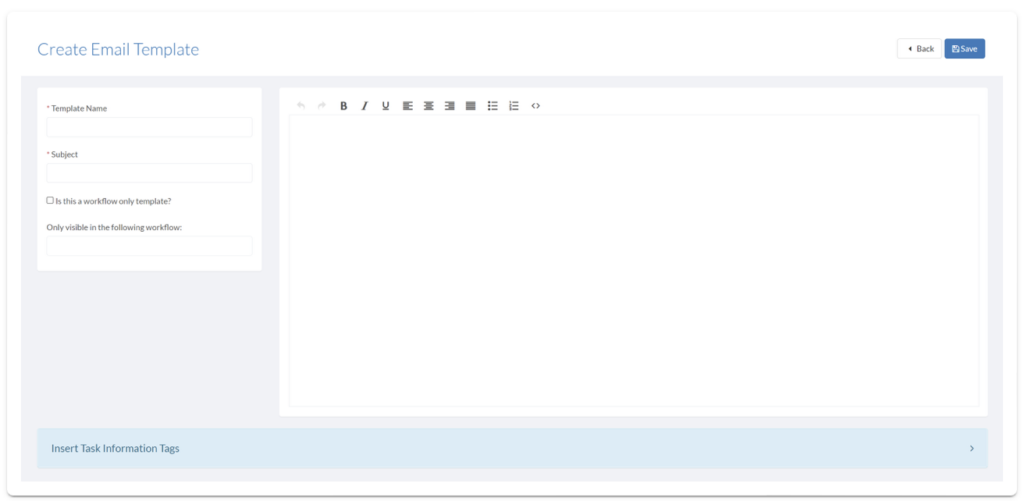
Create Email Template form with template name, subject, and HTML content editor

  1. ClickInsert Task Information Tagto open lists ofUser,Question,Task, andFile Tagsto copy and paste into your email template.
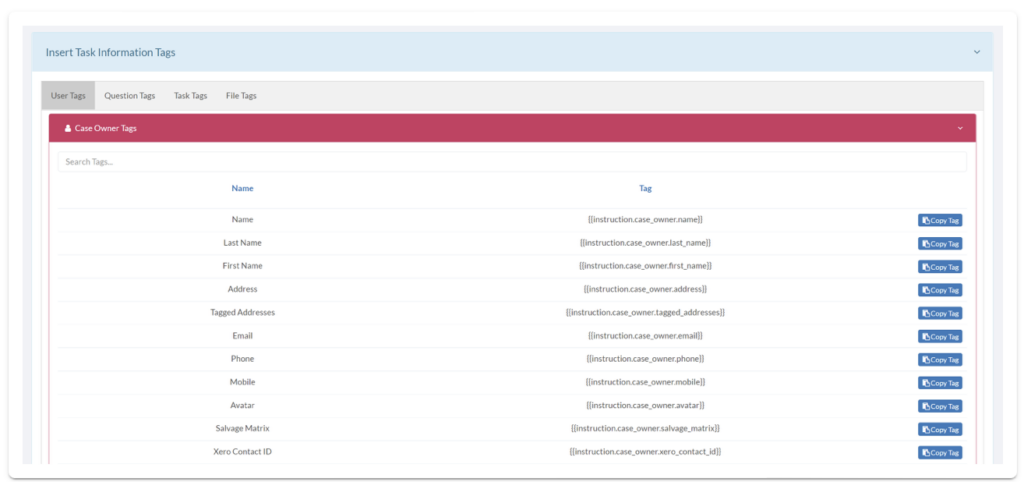
Insert Task Information Tag menu for adding dynamic user, question, and task tags to email templates

  1. ClickSave.

Note:

Tags are used to generate and display information from the Task, allowing each email to be customisable to the recipient/subject.

Example Email Template
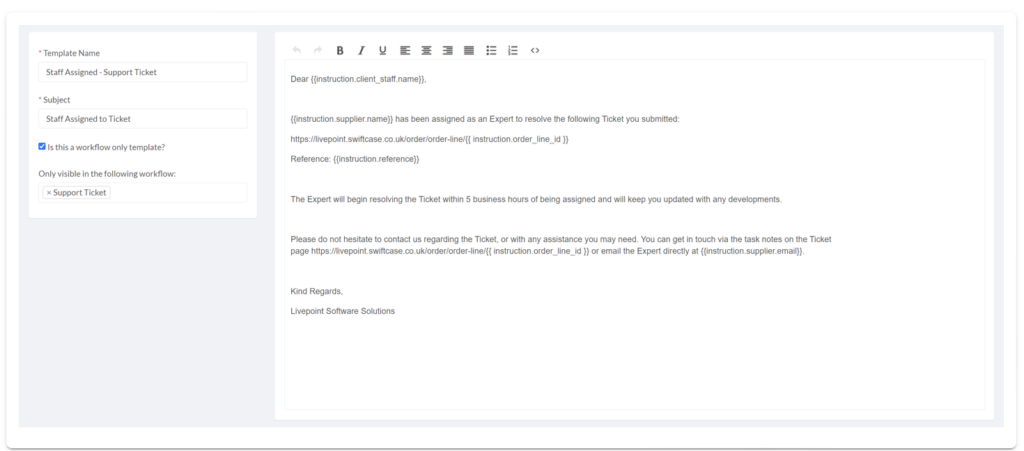
Example email template with dynamic tags for client name, assigned expert, ticket URL, and reference number

  • Address the Client Staff
  • Tell them the Expert that has been assigned to solve their ticket
  • Give them the URL of the ticket
  • Give them the Ticket Reference Number
  • Give them the Expert’s Email

Ready to automate your workflows?

SwiftCase helps operations teams streamline their processes with powerful workflow automation, case management, and AI-powered communication tools.

Book a demo | View pricing | Explore the platform

Related Articles

Workflow Automation

Case Management vs Workflow Management: What's the Difference?

March 2, 202612 min read
Workflow Automation

What is Workflow Automation? The Complete UK Guide (2026)

March 2, 202618 min read
Workflow Automation

15 Workflow Automation Examples from UK Businesses

March 2, 202614 min read

Get automation insights delivered

Join operations leaders who get weekly insights on workflow automation and AI.

About the Author

Dr. Adam Sykes
Dr. Adam Sykes

Founder & CEO

Founder & CEO of SwiftCase. PhD in Computational Chemistry. 35+ years programming experience.

View all articles by Adam →

Related Free Tools

Workflow Mapper

Draw your business process visually and export a professional PDF.

Try free

SLA Template Builder

Build and download a professional Service Level Agreement.

Try free

Meeting Cost Calculator

See the true cost of your meetings based on attendees and salary.

Try free

11.8M+ cases processed

See workflow automation in action

Build, deploy, and optimise workflows without writing a line of code.

Explore the Workflow Engine
Calculate Your ROI