


The Auto-allocate automated event automatically allocates a User to a Task. This User will be allocated based on specific requirements you can set, and the allocation will trigger once certain conditions are met.
Adding a Auto-allocate automated event
- Click the Automated Events tab in the Status to which you want to add the Auto-allocate.
- Drag and drop theAuto-allocateautomate event into the blank space to the right.
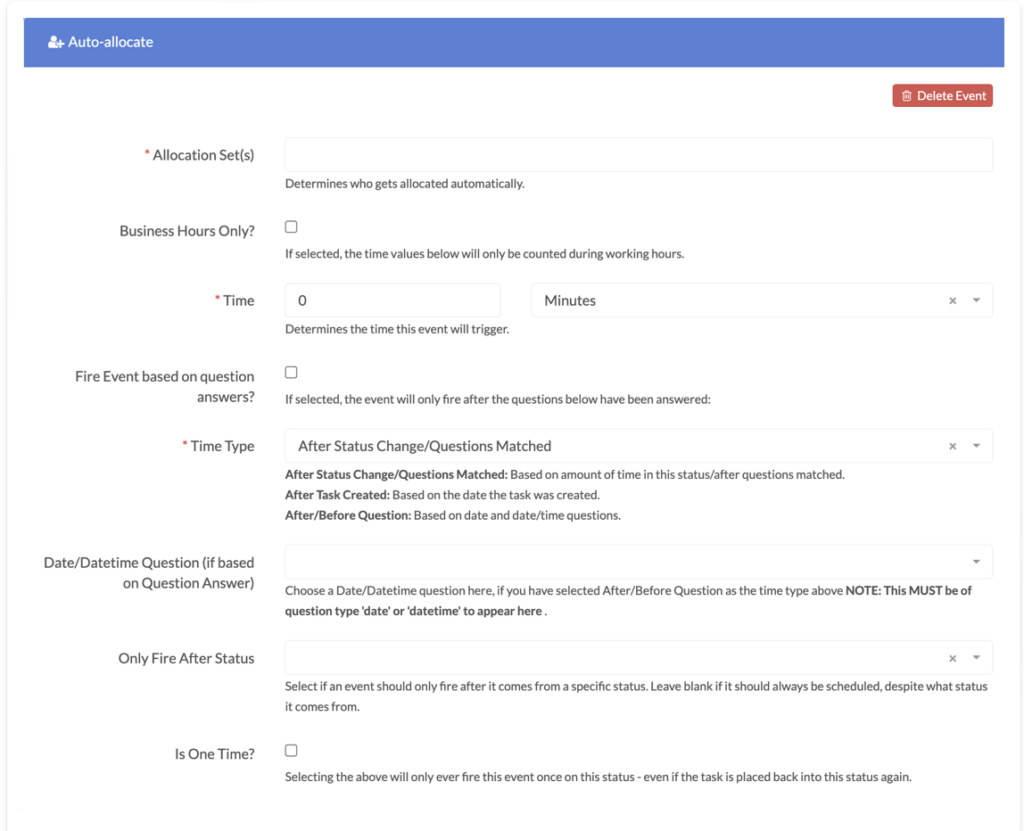
Choose from the Allocation Sets from theAllocation Set(s)dropdown options. This will determine who gets automatically allocated.
Check theBusiness Hours Only?checkbox if you want the Auto-allocation to only happen during business hours.
Determine the time the event will trigger using the Time boxes.
Check the Fire Event based on question answers? box if you want a question(s) to trigger the Auto-allocation. Checking this box will then display fields for you to add any questions and specify any answers if you want.
In the Time Type box choose rules about when the Auto-allocation will take place:
- After Status Change/Questions Matched: Based on the amount of time in this status/after questions matched.
- After Task Created: Based on the date the task was created.
- After/Before Question: Based on date and date/time questions.
Choose a Date/Datetime Question, if you selectedAfter/Before Questionas theTime Type. Note: this question must have the question typedateordatetimeto appear as a Date/Datetime Questionoption in the dropdown.
If the Auto-allocation should only trigger after coming from a specific status, enter this status in the Only Fire After Status box.
Check the IsOne Time?checkbox if you do not want the Auto-allocation to take place more than once, even if it is placed back into this status again.
Check theShould this event trigger when created as a child task?checkbox if you want this automated event to happen when the workflow is created as a child task.
Ready to automate your workflows?
SwiftCase helps operations teams streamline their processes with powerful workflow automation, case management, and AI-powered communication tools.