

SwiftCase
PlatformSwitchboardFeaturesSolutionsCase StudiesFree ToolsPricingAbout
Book a Demo
SwiftCase

Workflow automation for UK service businesses. Created in the UK.

A Livepoint Solution

Platform

  • Platform Overview
  • Workflow Engine
  • Case Management
  • CRM
  • Document Generation
  • Data Model
  • Integrations
  • Analytics

Switchboard

  • Switchboard Overview
  • Voice AI
  • Chat
  • Email
  • SMS
  • WhatsApp

Features

  • All Features
  • High-Volume Operations
  • Multi-Party Collaboration
  • Contract Renewals
  • Compliance & Audit
  • Pricing
  • Case Studies
  • Customers
  • Why SwiftCase

Company

  • About
  • Our Team
  • Adam Sykes
  • Nik Ellis
  • Implementation
  • 30-Day Pilot
  • Operations Pressure Map
  • For Your Role
  • Peer Clusters
  • Engineering
  • Careers
  • Partners
  • Press
  • Research
  • Tech Radar
  • Blog
  • Contact

Resources

  • Use Cases
  • Software
  • ROI Calculator
  • Pressure Diagnostic
  • Pilot Scope Estimator
  • Board Case Builder
  • Free Tools
  • Guides & Templates
  • FAQ
  • Compare
  • Glossary
  • Best Practices
  • Changelog
  • Help Centre

Legal

  • Privacy
  • Terms
  • Cookies
  • Accessibility

Stay in the loop

Cyber Essentials CertifiedGDPR CompliantUK Data CentresISO 27001 Standards

© 2026 SwiftCase. All rights reserved.

Back to Blog
Guides

How to Update User Permissions (Internal Admin)

Learn how to manage user permissions in SwiftCase. Internal admins can add and remove permissions to control what team members can access and modify.

Dr. Adam Sykes

Dr. Adam Sykes

Founder & CEO

June 6, 2024
3 min read
How to Update User Permissions (Internal Admin)
Contents
  • Updating User Permissions
  • Understanding Permission Roles
  • Standard User
  • Team Leader
  • Internal Admin
  • When to Adjust Permissions
  • Best Practices for Permission Management
  • Principle of Least Privilege
  • Regular Reviews
  • Document Changes
  • Separation of Duties
  • Troubleshooting Access Issues
  • Related Guides
  • Ready to automate your workflows?

Controlling who can access what is fundamental to secure, efficient operations. SwiftCase uses role-based permissions to ensure team members see exactly what they need:no more, no less. As an Internal Admin, you can manage these permissions for your team.

Updating User Permissions

Internal Admins can add and remove permissions for users. Follow these steps to update a user's permissions:

  1. Click on Users and then My Team Members
  2. Click on the team member whose permissions you want to update:this opens their profile page
  3. Select Change Permissions from the Account Settings panel
  4. Choose a Role from the available options and click Save
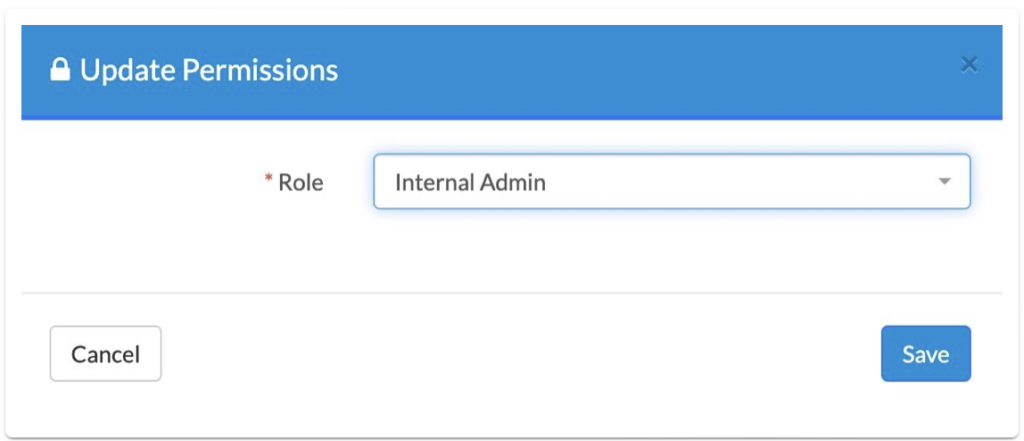
User profile page showing the Change Permissions panel with role selection options

Understanding Permission Roles

SwiftCase permissions are organised into roles that bundle related capabilities together:

Standard User

Can view and work on cases assigned to them. Suitable for team members who handle day-to-day case work without needing administrative access.

Team Leader

Everything a Standard User can do, plus visibility across their team's workload. Can reassign cases and view team performance metrics.

Internal Admin

Full access to system configuration including workflow design, user management, and reporting. Reserved for those responsible for maintaining the SwiftCase environment.

When to Adjust Permissions

Common scenarios requiring permission changes:

  • New team member: Assign appropriate role based on their responsibilities
  • Promotion or role change: Upgrade permissions to match new duties
  • Department transfer: Adjust workflow and case access for new team
  • Leaving the organisation: Revoke access promptly

Best Practices for Permission Management

Principle of Least Privilege

Grant the minimum permissions needed for someone to do their job. This reduces risk and keeps the interface uncluttered for users who don't need advanced features.

Regular Reviews

Periodically review who has access to what. Permissions granted for a specific project may no longer be needed. Remove access that's no longer required.

Document Changes

Keep a record of permission changes, especially for administrative access. This supports audit requirements and helps troubleshoot access issues.

Separation of Duties

For sensitive processes, ensure no single person has complete control. Different stages of approval or review should involve different people.

Troubleshooting Access Issues

If a team member reports they can't access something:

  1. Check their role: Does their current role include the required permission?
  2. Verify workflow access: Are they assigned to the relevant workflow?
  3. Review case assignment: Are they connected to the specific case?
  4. Check status permissions: Some statuses may restrict who can view or edit

Related Guides

  • How to get to the Workflow Builder
  • Understanding security in SwiftCase

Ready to automate your workflows?

SwiftCase helps operations teams streamline their processes with powerful workflow automation, case management, and AI-powered communication tools.

Book a demo | View pricing | Explore the platform

Related Articles

Guides

10 SwiftCase Features You're Probably Not Using (But Should Be)

December 5, 20258 min read
Guides

The Complete Guide to No-Code Platforms: Building Business Applications Without Programming

August 30, 202415 min read
Guides

The Complete Guide to Digital Transformation for Operations Teams

July 15, 202416 min read

Get automation insights delivered

Join operations leaders who get weekly insights on workflow automation and AI.

About the Author

Dr. Adam Sykes
Dr. Adam Sykes

Founder & CEO

Founder & CEO of SwiftCase. PhD in Computational Chemistry. 35+ years programming experience.

View all articles by Adam →

Related Free Tools

SLA Template Builder

Build and download a professional Service Level Agreement.

Try free

BCP Builder

Build a Business Continuity Plan with guided templates.

Try free

GDPR Data Retention Calculator

Check UK GDPR retention periods and deletion dates for 30+ data types.

Try free

11.8M+ cases processed

Go deeper with our resources

Step-by-step guides, templates, and best practices to help you get the most out of automation.

Browse Resources
Explore Our Tools