

SwiftCase
PlatformSwitchboardFeaturesSolutionsCase StudiesFree ToolsPricingAbout
Book a Demo
SwiftCase

Workflow automation for UK service businesses. Created in the UK.

A Livepoint Solution

Platform

  • Platform Overview
  • Workflow Engine
  • Case Management
  • CRM
  • Document Generation
  • Data Model
  • Integrations
  • Analytics

Switchboard

  • Switchboard Overview
  • Voice AI
  • Chat
  • Email
  • SMS
  • WhatsApp

Features

  • All Features
  • High-Volume Operations
  • Multi-Party Collaboration
  • Contract Renewals
  • Compliance & Audit
  • Pricing
  • Case Studies
  • Customers
  • Why SwiftCase

Company

  • About
  • Our Team
  • Adam Sykes
  • Nik Ellis
  • Implementation
  • 30-Day Pilot
  • Operations Pressure Map
  • For Your Role
  • Peer Clusters
  • Engineering
  • Careers
  • Partners
  • Press
  • Research
  • Tech Radar
  • Blog
  • Contact

Resources

  • Use Cases
  • Software
  • ROI Calculator
  • Pressure Diagnostic
  • Pilot Scope Estimator
  • Board Case Builder
  • Free Tools
  • Guides & Templates
  • FAQ
  • Compare
  • Glossary
  • Best Practices
  • Changelog
  • Help Centre

Legal

  • Privacy
  • Terms
  • Cookies
  • Accessibility

Stay in the loop

Cyber Essentials CertifiedGDPR CompliantUK Data CentresISO 27001 Standards

© 2026 SwiftCase. All rights reserved.

Back to Blog
Customer Success

Sending an Email in SwiftCase

You can send and receive emails in SwiftCase. Follow the steps below to learn how. Note: Please bear in mind that you have to have configured an.

Dr. Adam Sykes

Dr. Adam Sykes

Founder & CEO

June 6, 2024
3 min read
Sending an Email in SwiftCase
Contents
  • Note:
  • How to send an email to a User
  • How to send an email from a Task
  • Ready to automate your workflows?

You cansendandreceiveemails in SwiftCase. Follow the steps below to learn how.

Note:

Please bear in mind that you have to haveconfigured an Email Addressbefore being able to send and receive emails. To find out how to add an email to SwiftCase,view our guide.

How to send an email to a User

  1. ClickUsers.
  2. ClickMy Team MembersorMy Client Staffdepending on which User Type you want to email.
  3. From the list of Team Members or Client Staff, click on theUseryou want to email to get to theirProfile Page.
  4. ClickEmail User.
  5. Fill out theEmail User Formand click Send.
Email User form showing To, CC, BCC fields and email template selection on a user profile page

When clicking theEmail Userbutton on a user profile page, theSend To User Fieldwill pre-populate.

You can send the email to more Users, cc or bcc them in. Type their email into the Email Field, or their Name into the Users Field, and click the To, cc or bcc buttons.

You can also choose anEmail Templateto use. For more detail on how to use and create Email Templates,view our guide.

How to send an email from a Task

  1. Navigate to theTask Pageyou want to send an email from. To discover how to get to a Task’s page,view our guide.
  2. Open theQuick Actionspanel and clickCompose Email.
  3. Fill out theCompose Email Formand click Send.
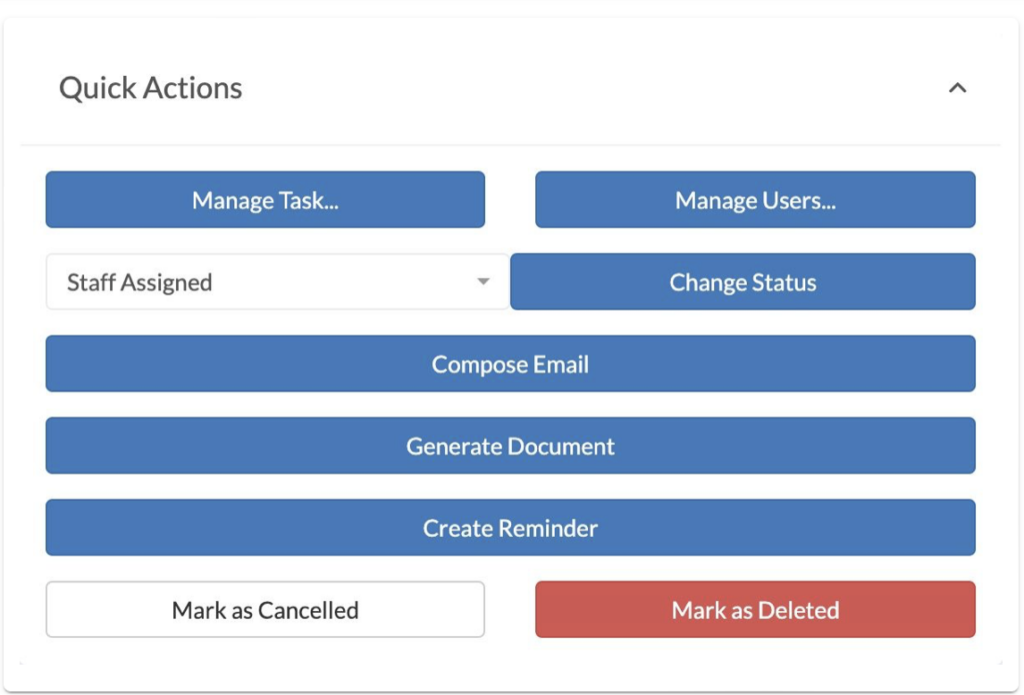
Compose Email form on a task page with pre-populated subject line from task reference

When clicking theCompose Emailbutton on the Task page, theSubjectwill pre-populate with theTask’s ReferenceandSummary.

You can send the email to more Users, cc or bcc them in. Type their email into theEmail Field, or their Name into theUsers Field, and click the To, cc or bcc buttons.

You can also choose anEmail Templateto use. For more detail on how to use and create Email Templates,view our guide.


Ready to automate your workflows?

SwiftCase helps operations teams streamline their processes with powerful workflow automation, case management, and AI-powered communication tools.

Book a demo | View pricing | Explore the platform

Related Articles

Customer Success

Business Finances: Take Back Control

January 26, 20225 min read
Customer Success

Choice Overload - Be a cunning cat, not a humming fox

January 5, 20225 min read
Customer Success

Does Game of Thrones teach us not to listen to clients?

October 6, 20215 min read

Get automation insights delivered

Join operations leaders who get weekly insights on workflow automation and AI.

About the Author

Dr. Adam Sykes
Dr. Adam Sykes

Founder & CEO

Founder & CEO of SwiftCase. PhD in Computational Chemistry. 35+ years programming experience.

View all articles by Adam →

Related Free Tools

Employee Cost Calculator

Calculate the true cost of employment including NI and pension.

Try free

Meeting Cost Calculator

See the true cost of your meetings based on attendees and salary.

Try free

SLA Template Builder

Build and download a professional Service Level Agreement.

Try free

11.8M+ cases processed

Join businesses already transforming

See how operations teams across the UK are saving time and reducing errors with SwiftCase.

Read Case Studies
Book a Demo