SwiftCase
PlatformSwitchboardFeaturesSolutionsCase StudiesFree ToolsPricingAbout
Book a Demo
SwiftCase

Workflow automation for UK service businesses. Created in the UK.

A Livepoint Solution

Platform

  • Platform Overview
  • Workflow Engine
  • Case Management
  • CRM
  • Document Generation
  • Data Model
  • Integrations
  • Analytics

Switchboard

  • Switchboard Overview
  • Voice AI
  • Chat
  • Email
  • SMS
  • WhatsApp

Features

  • All Features
  • High-Volume Operations
  • Multi-Party Collaboration
  • Contract Renewals
  • Compliance & Audit
  • Pricing
  • Case Studies
  • Customers
  • Why SwiftCase

Company

  • About
  • Our Team
  • Adam Sykes
  • Nik Ellis
  • Implementation
  • 30-Day Pilot
  • Operations Pressure Map
  • For Your Role
  • Peer Clusters
  • Engineering
  • Careers
  • Partners
  • Press
  • Research
  • Tech Radar
  • Blog
  • Contact

Resources

  • Use Cases
  • Software
  • ROI Calculator
  • Pressure Diagnostic
  • Pilot Scope Estimator
  • Board Case Builder
  • Free Tools
  • Guides & Templates
  • FAQ
  • Compare
  • Glossary
  • Best Practices
  • Changelog
  • Help Centre

Legal

  • Privacy
  • Terms
  • Cookies
  • Accessibility

Stay in the loop

Cyber Essentials CertifiedGDPR CompliantUK Data CentresISO 27001 Standards

© 2026 SwiftCase. All rights reserved.

Back to Blog
Compliance

Viewing a Task page

When you and your Team Members create tasks, each task will have its own task page. This page will be dedicated to that task- it houses all the.

Dr. Adam Sykes

Dr. Adam Sykes

Founder & CEO

June 6, 2024
3 min read
Viewing a Task page
Contents
  • Finding the Task
  • Note:
  • Quick Actions
  • The Document Manager
  • Task Notes
  • The Task Log
  • Note:
  • Ready to automate your workflows?

When you and your Team Members create tasks, each task will have its own task page. This page will be dedicated to that task- it houses all the information, relevant Clients and Team Members, and communication channels in one place.

Finding the Task

  1. Click format_list_numberedTasksto navigate to the Dashboard.
  2. Select the Workflow of the task you wish to view. At the bottom on the page, all the tasks with the selected Workflow will be displayed.
  3. Simply click on the Task you want to open.

Note:

You can also use the Search Form to find the task you wish to view. To discover how to use the Search Form view our guide.

Quick Actions

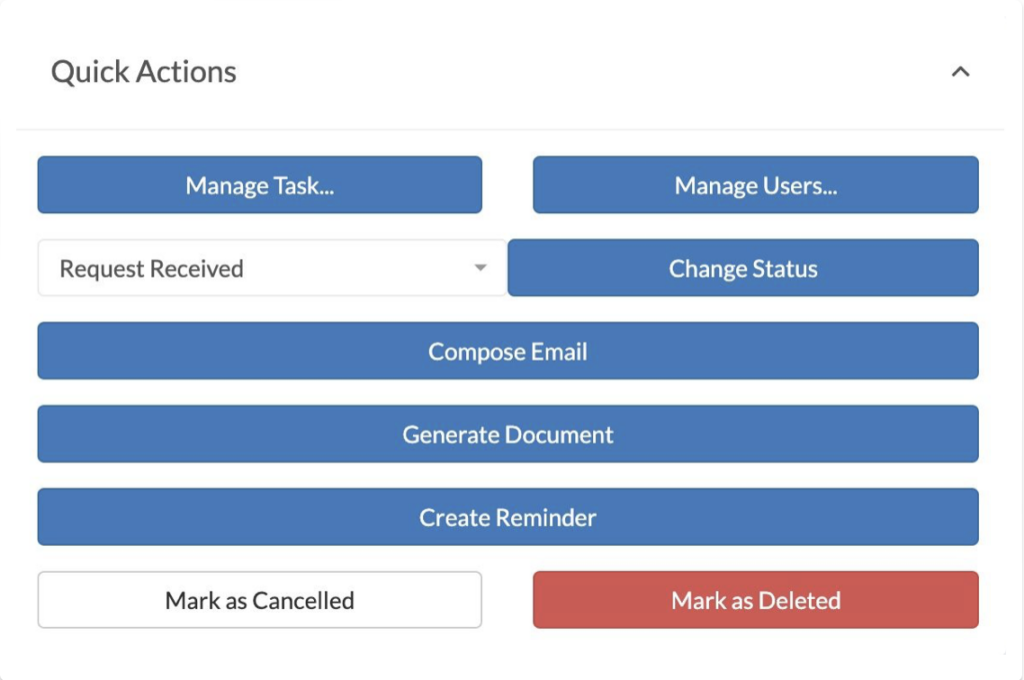
On all Task pages there areQuick Actions. These Actions include:

  • Change the task
  • Manage Users
  • Change the task status
  • Compose emails
  • Create reminders
  • Cancel the task
  • Delete the task

Task page Quick Actions panel showing options to change task, manage users, compose emails, and create reminders

The Document Manager

All Task pages also include the Document Manager. The Document Manager stores all the files related to your Task in one convenient place on the Task page.
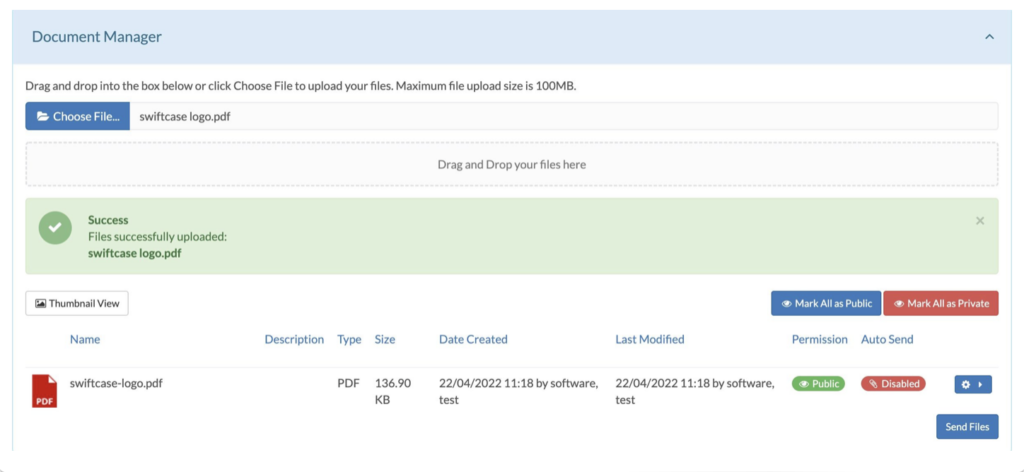
Document Manager panel on a task page showing uploaded files and document actions

Task Notes

The Task notes will display any notes that have been created or emails that have been sent regarding the Task.
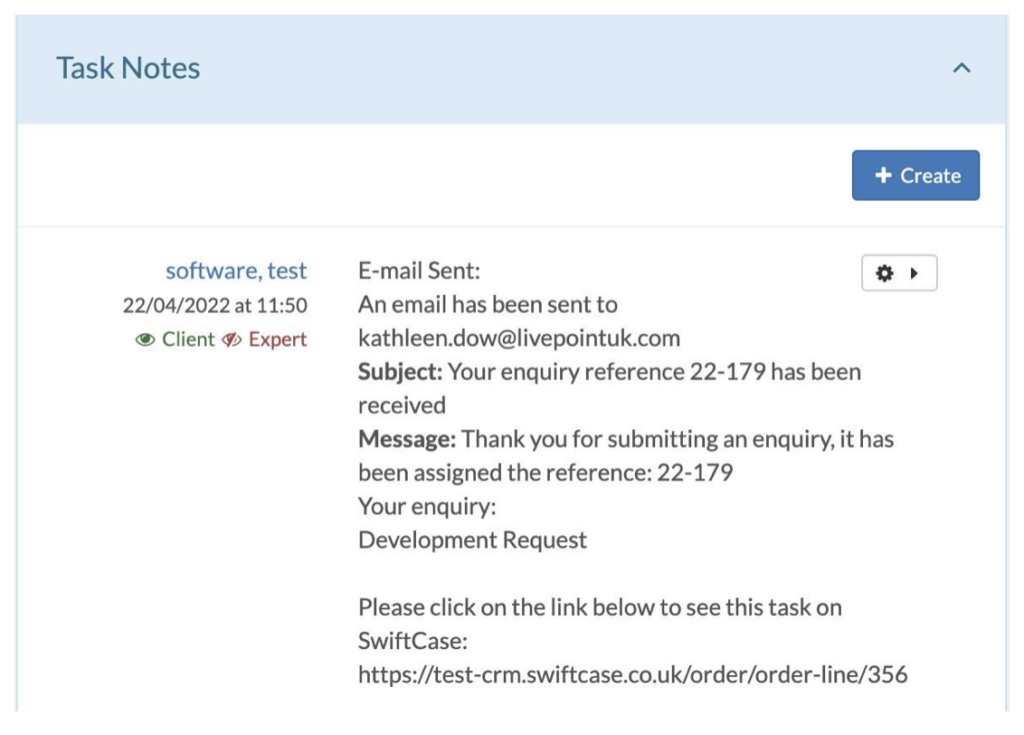
Task Notes section displaying logged notes and email communications for the task

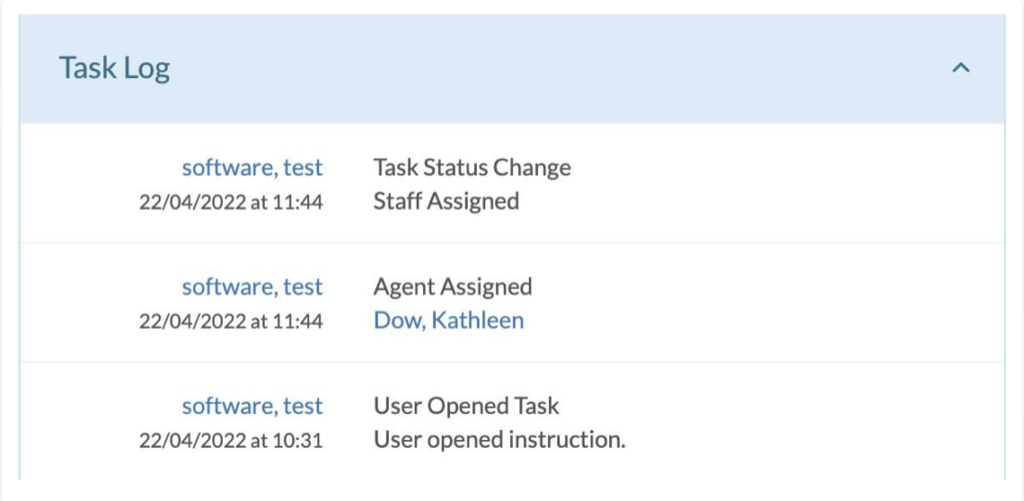
The Task Log

The Task Log details any events that have happened, relating to the task. These events include:

  • Auditing activity
  • Change in R. A. G. status
  • Change in Task status
  • Updated Case Owner’s
  • Whether the Task has been put on hold
  • User Auto Allocation
  • Failed Scheduled Events
  • Reminders
  • Creating Child Tasks
  • Auto User Creation

Task Log showing audit trail of status changes, user allocations, and event history

Note:

TheQuick Actions,Document Manager,Task LogandTask Noteswill be on every Task page by default. Everything else displayed on your Task page can be created and customised by you when creatingWorkflowsin the Workflow Builder.


Ready to automate your workflows?

SwiftCase helps operations teams streamline their processes with powerful workflow automation, case management, and AI-powered communication tools.

Book a demo | View pricing | Explore the platform

Related Articles

Compliance

November 2025: Intelligent Workflow Updates

November 27, 20256 min read
Compliance

Service Level Agreements: Discover How To Get Awesome Results

February 2, 202210 min read
Compliance

How can paraplanners improve their productivity?

December 29, 20215 min read

Get automation insights delivered

Join operations leaders who get weekly insights on workflow automation and AI.

About the Author

Dr. Adam Sykes
Dr. Adam Sykes

Founder & CEO

Founder & CEO of SwiftCase. PhD in Computational Chemistry. 35+ years programming experience.

View all articles by Adam →

Related Free Tools

FCA Compliance Checker

Free self-assessment across Consumer Duty, complaints, and governance.

Try free

Complaints Deadline Calculator

Instantly see every FCA DISP deadline for a complaint.

Try free

GDPR Data Retention Calculator

Check UK GDPR retention periods and deletion dates for 30+ data types.

Try free

11.8M+ cases processed

Stay ahead of compliance requirements

Automated audit trails, regulatory checks, and real-time reporting — built into every workflow.

Check Your FCA Compliance
Explore Insurance Solutions